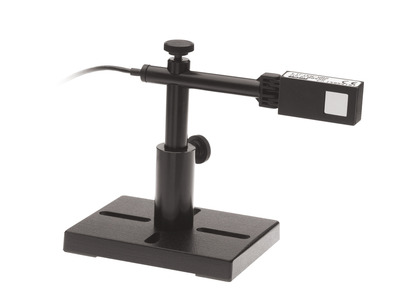
Radiometric Photodiode Power Sensors
Radiometric Photodiode Power Sensors
The PD300-BB radiometric sensor with swivel mount has a flat spectral response photodiode sensor for measuring broadband light sources. It covers the spectral range 430 to 1000 nm and has a 10x10 mm aperture. Its power measuring range is 50 pW to 4 mW.
The 50 mW version PD300-BB-50mW measures from 50 pW to 50 mW. The sensor comes with a removable filter and a 1.5 meter cable for connecting to a meter or PC interface.
- For measuring broadband light sources
- 430 to 1000 nm range
- 10 x 10 mm aperture See All Features
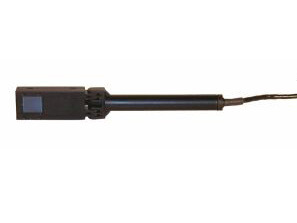

Specifications
- Aperture Size10x10 mm
- MaterialSilicon
- Spectral Range430-1000 nm
- Minimum Power50 pW
- Maximum Average Power4 mW (50 mW PD300-BB-50mW with filter)
- Maximum Average Power Density10 W/cm² (100 W/cm² PD300-BB-50mW with filter)
- Maximum Pulse Energy1 µJ (10 µJ PD300-BB-50mW with filter)
- Response Time0.2 s
- Cable Length1.5 m
- CE ComplianceYes
- UKCA ComplianceYes
- China RoHS ComplianceYes
Features
Measuring Very Low Laser Powers with a Photodiode Sensor
In this short “Basics” video, we review in general the use of photodiode sensors for measuring very low laser powers.
How to Measure Power of Broadband Sources
This video explains how to use Ophir sensors and meters to measure the power or energy of broadband light sources such as solar radiation, flash lamps, LEDs, etc.
Frequently Asked Questions
- I am using a PD300 type sensor. I have a broadband light source, but only want to measure the power of a specific wavelength. Can I set my meter to that wavelength and get a measurement?Answer
The PD300 series of photodiode-based sensors are calibrated with a full spectral curve using a scanning monochromator (plus a few laser "anchor points").
The wavelength ("Laser") setting tells the meter what wavelength is being used and hence what calibration factor to apply when a measurement is underway. It does not, however, physically limit the possibility of other wavelengths from entering. All light (within the sensor's specified range of course) entering the detector will be measured; the meter will apply the calibration factor meant for the selected wavelength, "thinking" that only that wavelength is present.
In other words, these sensors assume a monochromatic light source. Their relative spectral response is not flat and they are therefore not suited for broadband beams.
So, if you want to check one wavelength from a broadband source, you will need to use a wavelength filter that only passes that wavelength. Then you should set your meter to the appropriate wavelength to account for the detector's relative sensitivity.
- Do I need to recalibrate my instrument? How often must it be recalibrated?Answer
Unless otherwise indicated, Ophir sensors and meters should be recalibrated within 18 months after initial purchase, and then once a year after that.
Accessories
Customers that purchase the above items also consider the following items. Ophir-Spiricon meters and sensors include a standard manufacturers warranty for one year. Add a one year Extended Warranty to your meter or sensor, which includes one recalibration.
| Compare | Description | Drawings, CAD & Specs | Avail. | Price | ||
|---|---|---|---|---|---|---|
 | 7Z02418CDRH Adapter, Ø7 mm Aperture, PD300 Wand Type Power Sensor | |||||
 | 7Z08336CDRH Adapter, Ø3.5 mm Aperture, PD300 Wand Type Power Sensor | |||||
 | 7Z08221SC Fiber Adapter, PD300 Power Sensors | |||||
 | 7Z02210ST Fiber Adapter, PD300 Power Sensors | |||||
| 7Z02213FC Fiber Adapter, PD300 Power Sensors | |||||
| 7Z02212SMA Fiber Adapter, PD300 Power Sensors | |||||
 | 7E01125AOptical Sensor Cable, 5 m Length, Connect PD300 to Power Meter | |||||
| 7E01125BOptical Sensor Cable, 10 m Length, Connect PD300 to Power Meter | |||||
| 7E01125COptical Sensor Cable, 3 m Length, Connect PD300 to Power Meter | |||||
 | XWAR-SENSORExtended Warranty for Sensor |
Resources
Data Sheets
Catalogs
Power Sensors Catalog(11.2 MB, PDF) Laser Power & Energy Measurement and Laser Beam Analysis Catalog(27.5 MB, PDF)
Drawings & CAD
PD300-BB Drawing(115.6 kB, PDF) PD300-BB-50mW Drawing(144.3 kB, PDF)
Videos
Technical Notes
5 Situations Where Laser Performance Measurement is Necessary Effect of Ambient Conditions on Laser Measurements How to Properly Select a Laser Power or Energy Sensor