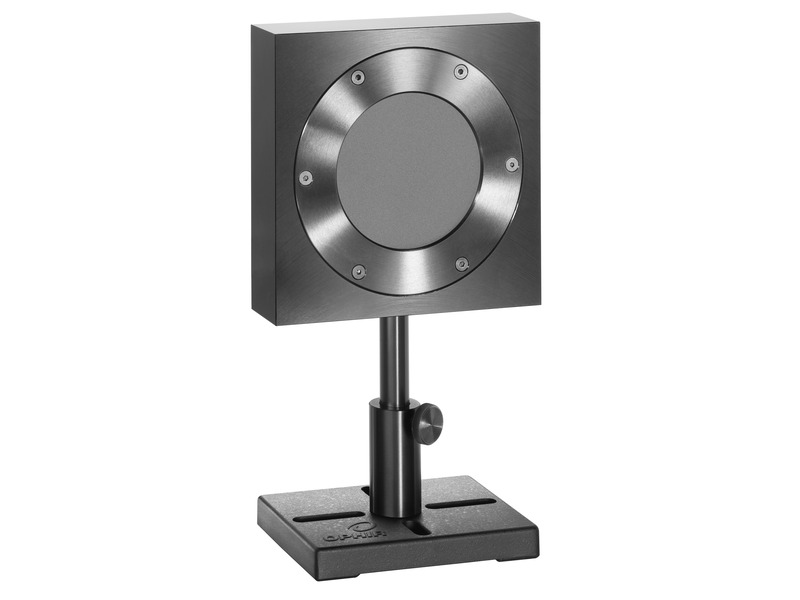
0.2 to 1000 J Air Coupled IPL Source Energy Sensor with Ø65 mm Aperture
0.2 to 1000 J Air Coupled IPL Source Energy Sensor with Ø65 mm Aperture
The L50(300)A-LP2-65 thermopile sensor is designed for high power density and long pulse lasers. This sensor also measures air coupled pulses from IPL dermatological sources. It is similar to the L50(300)A-IPL but does not have the window so is for air coupled sources only to provide the most accurate measurements. It has a 65 mm aperture and can measure optical power from 400 mW to 50 W continuously and to 300 W intermittently. The sensor can measure energy from 200 mJ to 1000 J. Its high damage threshold LP2 absorber covers the spectral range from 250 to 2200 nm.
- 250-2200 nm LP2 absorber
- Window removed for accurate measurement of air coupled IPL sources
- 0.2 to 1000 J energy measurement range
- Ø65 mm aperture See All Features
| Compare | Description | Drawings, CAD & Specs | Avail. | Price | ||
|---|---|---|---|---|---|---|
 | 7Z02782L50(300)A-LP2-65Intense Pulsed Light Sensor, LP2, 200 mJ to 1,000 J, Ø65 mm, 250-2200 nm |
Specifications
- Product NameL50(300)A-LP2-65
- Aperture SizeØ65 mm
- Absorber TypeLP2
- Spectral Range250 to 2200 nm
- Minimum Pulse Energy200 mJ
- Maximum Pulse Energy1000 J
- Maximum Average Power300 W
- Maximum Average Power Density17 kW/cm²
- Maximum Pulse Width3 s
- Damage Threshold (100 ns)0.1 J/cm²
- Damage Threshold (2 ms)130 J/cm²
- Cable Length1.5 m
- Dimensions120 x 120 x 30 mm (LxWxD)
- CE ComplianceYes
- UKCA ComplianceYes
- China RoHS ComplianceYes
Features
LP2 Sensors Coating With Very High Damage Threshold and Very Low Reflection
Even higher damage threshold…flat spectral response…absorption up to 96%... These are some of the characteristics of the new “LP2” type laser power sensors from Ophir.
Measuring Kilowatt Laser Beams with 50W Sensors
For measuring high average powers, you may not need to use a high average power, water-cooled, big and heavy sensor. This video shows you three practical solutions to “get away” with using lower power sensors to measure high power beams, using short exposure times.
Choosing a Thermal Sensor
In this short “Basics” video we review the use – and selection - of thermal sensors for measuring low, medium and high laser powers.
Thermal Power Sensor Accuracy
Ophir former CTO Dr. Ephraim Greenfield discusses the various factors that contribute to uncertainties in measurement when using Ophir laser power and energy meters.
Frequently Asked Questions
- What are the advantages of the new LP2 absorber coating vs the previous LP1 coating?Answer
The new LP2 coating has a number of advantages vs the previous LP1 coating:
Absorber
LP1 LP2 Damage Threshold at 1kW 6 kW/cm² 10 kW/cm² Damage Threshold at 3kW 2.5 kW/cm² 5 kW/cm² Damage Threshold at 5kW 2 kW/cm² 2.5 kW/cm² Pulsed damage threshold for 10ms pulses 160 J/cm² 400 J/cm² Spectral Absorption See graphs in technical note Angle dependence See graphs in technical note - How should I clean my sensor?Answer
First, clean the absorber surface with a tissue, using Umicore #2 Substrate Cleaner, acetone or methanol. Then dry the surface with another tissue. Please note that a few absorbers (Pyro-BB, 10K-W, 15K-W, 16K-W and 30K-W) cannot be cleaned with this method. Instead, simply blow off the dust with clean air or nitrogen. Don't touch these absorbers. Also, HE sensors (such as the 30(150)A-HE-17) should not be cleaned with acetone.
Note: These suggestions are made without guarantee. The cleaning process may result in scratching or staining of the surface in some cases and may also change the calibration. - For measuring high average powers, do I need to use a high average power sensor (normally big, heavy, water-cooled, expensive?Answer
It is partly right. Ophir has for many years had a few sensors that are designed for intermittent use. They are marked by two numbers like 50(150), which means it can measure 50 W continuously, or 150 W for a brief exposure (1.5 minutes in this example). Keeping in mind that power is energy over time, and that it is the total energy absorbed over time that causes a sensor to heat up, it should be possible to expose a sensor to “too high” power but only for a short time, and have the sensor survive the experience. The sensor can treat that short exposure as if it were just one long “single shot” pulse, and measure the energy of that pulse. Divide the energy by the (known) pulse width, and that gives the power during the pulse. (It can’t measure power directly this way, though, since a thermal sensor’s response time to power is itself a few seconds). For example, the moderate-power L40(250)A-LP2-50 has a 10KJ energy scale (several other sensors also have multi kJ scales). To measure power of an 8KW beam, we can fire the laser for 0.5 seconds with the sensor in energy mode, and we’ll measure 4KJ energy in the “pulse”. Dividing that by 0.5 seconds gives the 8KW beam power. Of course we then need to wait for the sensor to cool before repeating, but in some applications that may be perfectly OK.
If you have a Juno, Juno+, Centauri or StarBright meter, you can do the above automatically, with any power sensor, using StarBright’s “Pulsed Power” function where you input the pulse duration and the meter will give the readout directly in power.
- I see Ophir has released some new thermal sensors with an absorber called “LP2”. What is it?Answer
The new “LP2” type sensors are specially designed for beams having high power and high power density (and for pulsed beams, high energy density). The LP2 sensors are replacing the equivalent LP1 sensors. As impressive as the LP1 is, the LP2 was developed with the following improvements:
- Very high damage threshold, for both power density and energy density, for long pulse and CW beams.
- Spectrally flat. Since its absorption remains constant at widely differing wavelengths, this means that sensors based on the LP2 can be used for "white light" or polychromatic beams.
- Very high level of absorption (as high as 96%, depending on wavelength), meaning much less light is scattered back, which for high power beams is an important benefit.
- The absorption is also largely independent of incident angle, which means it can be used for divergent beams too.
- When an accuracy spec is given, what exactly is meant?Answer
The Ophir specification on accuracy is in general 2 sigma standard deviation. This means, for instance, that if we list the accuracy as +/-3%, this means that 95% of the sensors will be within this accuracy and 99% will be within +/-4%. For further information on accuracy see calibration procedure tutorial.
- If according to the catalog specs or the sensor finder I am very close to the damage threshold but below it, should I choose such a sensor?Answer
It is not recommended to choose a sensor if it is very close to the damage threshold if there is an alternative, since laser damage is not an exact figure and depends on many things. Use the Sensor Finder to find the best match where you are preferably below 50% of the damage threshold.
- How do I select the correct wavelength with sensors that have a continual response curve such as silicon photodiode sensors, -LP1/LP2 thermal sensors and 3A-IS sensors?Answer
The sensors with a continual response curve such as the ones listed above come with preset "favorite" wavelengths. If these "favorite" wavelengths do not match the application wavelength you are using they can be changed by performing the instructions below, which are for the Vega meter. For your specific meter, please see the User Manual.
- While the Vega is off, plug in the head. Switch on the Vega.
- From the main measurement screen, press "Laser" to select the correct laser wavelength. If you want to save this new wavelength as the startup default, press "Save" before exiting. If the wavelength you want is not among the wavelengths in the six wavelengths listed and you want to change or add a wavelength, see the next step
- Changing Chosen Wavelengths:
- From the power measurement screen select "Laser" and enter. Move to the wavelength you wish to change or add. Press the right navigation key.
- Using the up/down keys to change each number and the right/left keys to move to the next number, key in the desired wavelength. Press the Enter key to exit. If you wish to save this new wavelength as one of the 6 favorite wavelengths, press "Save".
Note: Saving the new wavelength in the Modify screen will not set this wavelength as the default startup wavelength. To do so, you must follow the instructions in Step 2 above.
- How long can I use a thermal sensor designed for intermittent use at higher powers than it is designed for continuous use?Answer
Thermal sensors for intermittent use such as models 30(150)A, L40(250)A-BB-50 etc. can be used up to the powers in parenthesis for a period given approximately by the following formula: The rule of thumb is that you can use the sensor for 1 minute/watt/cm3 of sensor. So for 150 watts for 30(150)A you have 1minute*165cm3/150watt =~ a little over one minute. The sensor finder program calculates the allowability of intermittent use when the user fills out the choice for duty cycle.
- Does the damage threshold depend on power level?Answer
The damage threshold of thermal sensors does depend on the power level and not only the power density because the sensor disc itself gets hotter at high powers. For instance, the damage threshold of the Ophir broadband coating may be 50KW/cm2 at 10 Watts but only 10KW/cm2 at 300W. The Ophir specifications for damage threshold are always given for the highest power of use of a particular sensor, something which is not done by most other manufacturers. This should be taken into account when comparing specifications. The Sensor Finder takes the power level into consideration when calculating damage threshold.
- Must I use a particular sensor only with the meter it was ordered with?Answer
Ophir meters and sensors are calibrated independently. Each meter has the same sensitivity as the other within about 2 tenths of a percent. Each sensor is calibrated independently of a particular meter with its calibration information contained in the DB15 plug. When the sensor is connected to the meter, the meter reads and interprets this information. Since the accuracy of our sensors is typically +/-3%, the extra 0.2% error that could come from plugging into a different meter is negligible and therefore it does not matter which calibrated meter we use with a particular calibrated sensor.
- Can a laser measurement depend on the distance from the laser to the sensor?Answer
In theory, if a beam is completely parallel and fits within the aperture of a sensor, then it should make no difference at all what the distance is. It will be the same number of photons (ignoring absorption by the air, which is negligible except in the UV below 250nm). If, nevertheless, you do see such a distance dependence, there could be one of the following effects happening:
- If you are using a thermal type power sensor, you might actually be measuring heat from the laser itself. When very close to the laser, the thermal sensor might be “feeling” the laser’s own heat. That would not, however, continue to have an effect at more than a few cm distance unless the light source is weak and the heat source is strong.
- Beam geometry – The beam may not be parallel and may be diverging. Often, the lower intensity wings of the beam have greater divergence rate than the main portion of the beam. These may be missing the sensor's aperture as the distance increases. To check that you'd need to use a profiler, or perhaps a BeamTrack PPS (Power/Position/Size) sensor.
- If you are measuring pulse energies with a diffuser-based pyroelectric sensor: Some users find that when they start with the sensor right up close to the laser and move it away, the readings drop sharply (typically by some 6%) over the first few cm. This is likely caused by multiple reflections between the diffuser and the laser device, which at the closest distance might be causing an incorrectly high reading. You should back off from the source by at least some 5cm, more if the beam is not too divergent.
Needless to say, it’s also important to be sure to have a steady setup. A sensor held by hand could easily be moved around involuntarily, which could cause partial or complete missing of the sensor’s aperture at increasing distance, particularly for an invisible beam.
- Do I need to recalibrate my instrument? How often must it be recalibrated?Answer
Unless otherwise indicated, Ophir sensors and meters should be recalibrated within 18 months after initial purchase, and then once a year after that.
- How is the performance of thermal sensors affected by ambient temperature?Answer
Water cooled sensors will hardly be affected by ambient temperature since the sensor temperature is determined by the water temperature. Ophir convection and fan cooled sensors are designed to operate in an ambient environment of 25°C up to the maximum rated power continuously. When operating at its maximum rated power, the sensor’s body should typically not exceed about 80°C in temperature.
Note: If the room temperature is higher than 25°C, then the maximum power (at which the sensor can be safely operated) should be derated accordingly from the specified maximum (since dissipation of the heat from inside the sensor to the surrounding air will be more difficult). For example, if the room temperature is 35°C, then the maximum power limit should be (80-35)/(80-25) = 82% of maximum rated power as given in the sensor’s spec.
Accessories
Thermal Sensor Cables
Order a cable of a different length along with the sensor to receive a cable other than the standard 1.5 m length.

Sensor Connector to BNC Adapter
The SH to BNC Adapter allows the connection of an Ophir sensor to a current or voltage measuring device for measurement of the raw sensor analog output. A current meter should be used for photodiode sensors. Current or voltage meters can be used for thermal sensors.

Extended Warranty for Sensor
Customers that purchase the above items also consider the following items. Ophir-Spiricon meters and sensors include a standard manufacturers warranty for one year. Add a one year Extended Warranty to your meter or sensor, which includes one recalibration.
| Compare | Description | Drawings, CAD & Specs | Avail. | Price | ||
|---|---|---|---|---|---|---|
 | XWAR-SENSORExtended Warranty for Sensor |
Resources
Data Sheets
Medium Power Large Aperture Thermal Sensors - Sensors for Intense Pulsed Light IPL Datasheet(291.8 kB, PDF)
Technical Notes
Absorption, Angle Dependence and Damage Graphs for Thermal Sensors(216.1 kB, PDF) 5 Situations Where Laser Performance Measurement is Necessary Effect of Ambient Conditions on Laser Measurements How do I know what range, or scale, to set my power/energy meter to? Setting Your Thermal Sensor up in Energy Mode for the Best Accuracy and Repeatability How Much of the Power Sensor Aperture Can My Laser Fill Up? How to Properly Select a Laser Power or Energy Sensor Common Reasons for Thermal Sensor Damage or Out of Tolerance Conditions
Drawings & CAD
L50(300)A-LP2-65 Drawing(131 kB, PDF)
Catalogs
Power Sensors Catalog(11.2 MB, PDF) Laser Power & Energy Measurement and Laser Beam Analysis Catalog(27.5 MB, PDF)