Silicon Scanning Slit Beam Profiler with 5 µm Slit Size
Silicon Scanning Slit Beam Profiler with 5 µm Slit Size
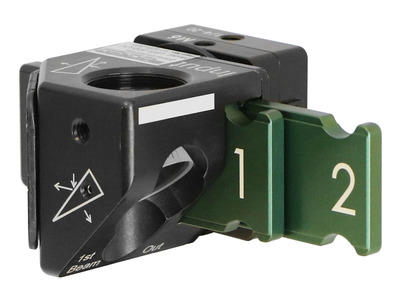
The NanoScan™ 2s Si/9/5 scanning-slit profiling system accurately captures and analyzes wavelengths from 190 nm to 1100 nm with its Silicon detector. It features a 5 µm slit size suitable for most beams, near real-time data capture rates, an optional power measurement feature, and operates in CW or kHz Pulsed modes which makes it ideal for comprehensive analysis of UV, Visible, and NIR lasers.
- 9 mm aperture for beam sizes from 20 µm to 6 mm
- Power Levels of 10 nW to 10 W
- Silicon detector covers 190 to 1100 nm spectral range
- USB 2.0 Interface
- NanoScan Standard or Professional software included See All Features

Software
NanoScan Standard
NanoScan Standard is our full-function software with a extensive set of NIST traceable ISO beam width and roundness, beam position, and M2 measurements and a customizable under interface with the ease-of-use and flexibility that customers have come to expect.
NanoScan Professional
NanoScan Professional has all of the functionality that NanoScan Standard includes. NanoScan Professional supports all of our scanning slit profilers, but includes an automation interface written in ActiveX to push data to your custom applications.
Specifications
- Product NameNanoScan 2s Si/9/5
- Sensor TypeSilicon Photodetector
- Spectral Range190 to 1100 nm
- Slit Size5 µm
- Aperture Size9 mm
- Beam Size20 µm to 6 mm
- Scanhead Size83 mm
- Power Range10 nW to 10 W
- CommunicationUSB 2.0
- CE ComplianceYes
- UKCA ComplianceYes
- China RoHS ComplianceYes
Features
NanoScan 2s Slit Profiler Demonstration
Why Measure Your Laser Beam?
This tutorial is presented by Ophir-Spiricon sales engineers - the experts in the field of measuring lasers and in helping you get the most out of your laser beam.
Fundamentals of Laser Measurement & Beam Profiling
Is your laser's beam profile shaped correctly for your application? This video teaches the fundamentals of laser beam profiles and discusses the benefits of profiling your laser beam. Several case studies are presented showing before and after laser beam profiles.
Frequently Asked Questions
- Where is the detector in the NanoScan?Answer
The detector is mounted internal to the NanoScan behind the rotating slits. This position is not important to the measurements. The measurement plane is the scan plane of the slits, which is nominally 0.74 mm ±0.025 mm from the Reference Surface on the front of the NanoScan. Please refer to the mechanical drawings in Appendix B of the NanoScan Operational Manual.
- After setting up the NanoScan profiler and acquiring the beam, why is the profile bouncing back and forth?Answer
This is usually caused by the Automatic ROI selection. After acquiring the beam, you should then uncheck the Auto ROI in the ROIs menu and the beam should stabilize.
- Will the NanoScan slit diffract the beam?Answer
Yes, but since the NanoScan measures all the light on the detector as a function of slit position, this does not affect the measurement results.
- Can I get closer to the front of the NanoScan V2 since it has a new C-Mount adapter ring?Answer
The NanoScan V2 product is great for looking at focused spots, but sometimes the C-Mount ring that is on the front can get in the way mechanically. By removing the three retaining screws it will allow you to remove this ring so you can get mechanically closer to the front of the NanoScan V2. Care should be used when removing these screws and the ring so something does not fall down inside the input aperture of the NanoScan V2. It is recommended that if you are going to remove the C-Mount ring that you invert the NanoScan V2 so it is looking at the floor and then remove the screws and the C-Mount ring to allow gravity to work in your favor and pull them away from the input aperture.
- Can multiple NanoScans be run from the same PC, or can you connect multiple NanoScans and select the one you want to run?Answer
Actually, only one NanoScan can be run from the NanoScan software at a time. If you did connect multiple NanoScans, only one will be recognized and able to run, and the other(s) will not be selectable.
- My NanoScan system is giving me an error that says" The selected speed could not be set within 0.01%!" What does this mean?Answer
This means that the motor is not able to set the rotation speed to within 0.01% precision. This typically means that the motor is wearing out, or that something is causing the motor to not be able to rotate at a constant speed. This typically requires that the system come back to the factory for inspection and repair.
- Why is the silicon NanoScan not recommended for 1064 nm beam measurements?Answer
The silicon detector is very transparent to NIR light >1000 nm. If it is used for measuring these beams, you will often see a tailing profile, because the signal does not decay fast enough. This will lead to erroneous results. We recommend using the germanium, or if there is enough power, the pyro electric detector for these wavelengths.
Accessories
| Compare | Description | Drawings, CAD & Specs | Avail. | Price | ||
|---|---|---|---|---|---|---|
 | PH00417NSv2 STD to NSv2 PRO Software Upgrade | |||||
 |
Resources
Drawings & CAD
NanoScan2s Drawing(307.5 kB, PDF)
Data Sheets
Scanning-Slit Profilers Datasheet (505.4 kB, PDF)
Manuals
NanoScan2 Installation and Operation Manual(5.1 MB, PDF)
Application Notes
Technical Articles
Reducing Production Waste with Laser Profiling Measuring Pulsed Lasers with NanoScan 2s State-of-the-Art Report: Laser Beam Measuring Instruments ISO Compliance of Non-contact, Real-time Beam Analysis Imaging UV light with CCD Cameras Making High Power Measurements with Little to No Attenuation The Challenge of Focus Shift in High Power Laser Material Processing Measuring Laser Position & Pointing Stability
Catalogs
Laser Beam Profilers Catalog (7.6 MB, PDF) Laser Power & Energy Measurement and Laser Beam Analysis Catalog(27.5 MB, PDF)
Technical Notes
Finding the Center of the NanoScan How to Profile Pulsed Lasers with a Scanning Slit How Can You Tell if Your NanoScan Has a Bad Slit? Measuring Lasers Used in Photovoltaic Solar Panel Manufacturing Multiple Beam Analysis with the NanoScan Integrated Solutions Upgrading NS v2 software from Standard to Professional Measurement of Mode Field Diameters of Tapered Fibers and Waveguides for Low Loss Components Understanding Dynamic Range…The Numbers Game