EZ Mount™ Lens Mount for Amada CO2 Cutting Machines
EZ Mount™ Lens Mount for Amada CO2 Cutting Machines
The EZ mount is the only re-usable focusing lens mount for Amada Lasers. Without any screws or small springs, EZ-Mount features a turn-to-open mechanism enabling quick, safe removal of lenses for on-the-spot cleaning or replacement. EZ Mounts eliminate the need for an inventory of expensive lenses and mounts and allow you to purchase only the lenses you need, when you need them.
- Quick, safe lens removal
- O-Ring replaces the potentially toxic indium wire
- Superior cost-effectiveness See All Features
| Compare | Description | Drawings, CAD & Specs | Avail. | Price | ||
|---|---|---|---|---|---|---|
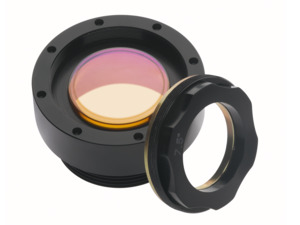 | 6516405EZ Mount™ Lens Assembly, 5.0 in. Focal Length, 2.0 in Diameter, Amada | |||||
| 6516406EZ Mount™ Lens Assembly, 7.5 in. Focal Length, 2.0 in Diameter, Amada | |||||
 | 680003-001EZ Mount™ Lens Assembly, 7.5 in. Focal Length, 1.5 in Diameter, Amada | |||||
| 680004-001EZ Mount™ Lens Assembly, 5.0 in. Focal Length, 1.5 in Diameter, Amada | |||||
| 680100-001EZ Mount™ Lens Assembly, 7.5 in. Focal Length, 2.0 in Diameter, Amada |
Features
Assembling a Lens on Ophir EZ Mount for Amada Pulsar Lasers
Mounting the Ophir EZ Mount on the Amada Pulsar NT Lasers
Assembling a lens on Ophir EZ mount for Amada FONT, Alpha IV, EML-Z (Combi) Lasers
Mounting the Ophir EZ mount on the Amada FONT, Alpha IV, EML-Z (Combi) Lasers
AMADA Quattro EZ Mount - Assembly Instructions
To install/uninstall the unit:
- Assemble the key handle to the plate.
- Attach the assembled key to the mount.
- Install/Uninstall the mount to the cutting head.
To remove the lens (for replacement or maintenance):
- Attach the key handle to the inner ring.
- Open the inner ring CW.
- Remove the internal spring.
- Release the lens.

Resources
Catalogs
Laser Optics Catalog(487.6 kB, PDF)