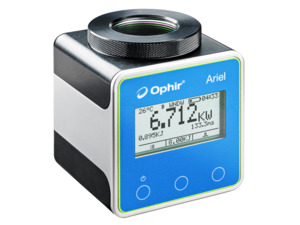
Ariel Industrialized Laser Power Sensors with Display
Ariel Industrialized Laser Power Sensors with Display
The Ariel measures high power industrial lasers of up to 8kW by measuring the energy of a short exposure to this power. The laser is set to deliver a pulse of from 0.05 to several seconds. The Ariel then measures the energy and duration of the laser pulse and calculates the power.
- Measures up to 8000 W
- Compact and self-contained with built in display
- No Water Cooling
- Dust proof, splash proof
- Includes a detachable diffuser for high power density beams
- Wavelengths: 440-550nm, 900-1100nm, 2.94μm, 10.6μm See All Features
Software
PC Software & Drivers
This section describes various ways to interface the Ophir meter to your PC as well as the software options available. Check out the datasheet for more details.
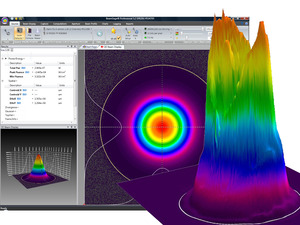
The StarLab application together with an Ophir meter turns your PC or laptop into a full-fledged laser power/energy meter. Supports most Ophir laser power/energy sensors. Up to 8 sensors can be displayed at once on one PC. By using the Ophir COM Object, you can control the device from your own application. Supports the Ariel, Centauri, StarBright, StarLite, Juno, Juno+, Nova II, Vega, Pulsar-1/2/4, Quasar, EA-1 and Ariel devices.
StarViewer turns your Android or iOS based smartphone into a portable Ophir laser power / energy measurement monitor.
The iOS version of StarViewer works with Ariel sensor.
The Android version of StarViewer works with Ariel, as well as with Juno and Quasar interfaces.
Firmware - Ariel & Ariel-USB (latest version 1.38)
Embedded Software for Ariel
Use StarLab version 3.62 (and up) to upgrade the firmware of your device. Press Here for step-by-step instructions.
Specifications
- Product NameAriel
- Spectral Range440-550 nm, 900-1100 nm, 2.94 µm, 10.6 µm
- Absorber TypeLP2
- Aperture SizeØ32 mm
- Minimum Power0.2 W
- Maximum Average Power8 kW
- Maximum Pulse Energy2.4 kJ
- Backscattered PowerLP2 absorber: 4% (<2200 nm), 10% (2940 nm), 25% (10.6 µm); With window: 5%; With Diffuser: 25%
- Response Time3 s
- Dimensions70 x 70 x 80 mm (LxWxD)
- CE ComplianceYes
- UKCA ComplianceYes
- China RoHS ComplianceYes
Features
Ariel, Ultra-Compact "All in One" Sensor Overview
Designed for OEM and end-user applications in closed and confined spaces, such as additive manufacturing, metal cutting, and welding, the Ariel power meter is a robust, battery-powered device that requires no water or fan cooling and is small enough to fit in the palm of your hand. The system measures laser powers from 200 mW to 8 kW, and at a wide range of wavelengths, including 440-550nm green and blue lasers, increasingly popular in copper welding.
Choosing a Thermal Sensor
In this short “Basics” video we review the use – and selection - of thermal sensors for measuring low, medium and high laser powers.
Measuring Ultra High Power Laser Beams
Laser beams with powers of many tens of Kilowatts are becoming more and more common in today's applications, industrial as well as research. This video will discuss the technical challenges in measuring such lasers, and will show you a range of solutions now available from Ophir for measuring up to 100KW -- safely, and accurately.
How to Use the StarViewer Android App to Operate the Ariel
In this short video, you'll learn how to use the "StarViewer" Android App to operate the Ariel, Ophir’s new ultra-compact self-contained industrial power meter.
Ariel All-in-One High Power Laser Sensor: How to Use
Learn how to use the Ariel, Ophir’s new ultra-compact "All in One" sensor for measuring high power industrial lasers up to 8KW.
A Great Instrument is Now Even Better
The Ophir Ariel - a palm-sized, robust laser power meter for high power industrial applications - has just been made even better! Check it out in this video.
Frequently Asked Questions
- How do you calculate the power and energy density of a laser beam?Answer
If the power is P and the diameter of the beam is D then the power density is P /(.785 * D2) . If it is a pulsed laser and the energy is E, the repetition rate is R and the diameter is D then the power density is E*R/(.785 * D2), The energy density is E/(.785 * D2). The sensor finder will automatically calculate the power and energy density.
- When an accuracy spec is given, what exactly is meant?Answer
The Ophir specification on accuracy is in general 2 sigma standard deviation. This means, for instance, that if we list the accuracy as +/-3%, this means that 95% of the sensors will be within this accuracy and 99% will be within +/-4%. For further information on accuracy see calibration procedure tutorial.
- Does the damage threshold depend on power level?Answer
The damage threshold of thermal sensors does depend on the power level and not only the power density because the sensor disc itself gets hotter at high powers. For instance, the damage threshold of the Ophir broadband coating may be 50KW/cm2 at 10 Watts but only 10KW/cm2 at 300W. The Ophir specifications for damage threshold are always given for the highest power of use of a particular sensor, something which is not done by most other manufacturers. This should be taken into account when comparing specifications. The Sensor Finder takes the power level into consideration when calculating damage threshold.
- Do I need to recalibrate my instrument? How often must it be recalibrated?Answer
Unless otherwise indicated, Ophir sensors and meters should be recalibrated within 18 months after initial purchase, and then once a year after that.
- How do I set the Ariel to the 8KW range? I only see ranges up to 500W, but the specification says it can measure up to 8KW.Answer
The Ariel has 2 power measurement modes: CW and Short Exposure.
- In CW mode, it can measure from 200mW up to 500W (up to 30W continuously, and up to 500W intermittently – up to 20 seconds at a time for 500W). The power ranges available in this mode are 500W/ 80W/ 8W.
- In Short Exposure mode, it can measure up to 8KW, from a short exposure to the high power (typically about 0.3 seconds for the maximum 8KW). The power ranges available in this mode are 8kW/ 800W/ 80W/ 8W. The Ariel does not need water cooling – and is therefore as small as it is - because it is exposed to the very high power beams for only these short “pulses”.
Detailed instructions for how to use the Ariel can be found in a video on our website.
- Can a laser measurement depend on the distance from the laser to the sensor?Answer
In theory, if a beam is completely parallel and fits within the aperture of a sensor, then it should make no difference at all what the distance is. It will be the same number of photons (ignoring absorption by the air, which is negligible except in the UV below 250nm). If, nevertheless, you do see such a distance dependence, there could be one of the following effects happening:
- If you are using a thermal type power sensor, you might actually be measuring heat from the laser itself. When very close to the laser, the thermal sensor might be “feeling” the laser’s own heat. That would not, however, continue to have an effect at more than a few cm distance unless the light source is weak and the heat source is strong.
- Beam geometry – The beam may not be parallel and may be diverging. Often, the lower intensity wings of the beam have greater divergence rate than the main portion of the beam. These may be missing the sensor's aperture as the distance increases. To check that you'd need to use a profiler, or perhaps a BeamTrack PPS (Power/Position/Size) sensor.
- If you are measuring pulse energies with a diffuser-based pyroelectric sensor: Some users find that when they start with the sensor right up close to the laser and move it away, the readings drop sharply (typically by some 6%) over the first few cm. This is likely caused by multiple reflections between the diffuser and the laser device, which at the closest distance might be causing an incorrectly high reading. You should back off from the source by at least some 5cm, more if the beam is not too divergent.
Needless to say, it’s also important to be sure to have a steady setup. A sensor held by hand could easily be moved around involuntarily, which could cause partial or complete missing of the sensor’s aperture at increasing distance, particularly for an invisible beam.
Accessories
USB Cable for Ariel
USB-A to USB-C cable (1 unit supplied with Ariel).

USB Power Supply
Power Supply AC/DC 5V 2.1A with USB-A socket (1 unit supplied with Ariel).
Ariel DIF housing, window ready kit
One of the improvements in this new Ariel version is that the window and the diffuser can now be stacked together, to protect the diffuser from particles and contamination. This has been made possible by a redesigned diffuser housing.
Customers with the previous Ariel version (part number 7Z02798) who wish to have their Ariel upgraded to enable such stacking of the window and diffuser can do so, by having their diffuser housing replaced by the new diffuser housing; the upgraded Ariel will then need to be recalibrated to include the diffuser + window combination, and will be converted to a new part number, 7Z07148 (note that this is not the same part number as the new Ariel).
Please contact an Ophir Service Center.

Ariel Window Replacement Kit
Kit for replacing a damaged window in Ariel and Ariel-USB
Extended Warranty for Sensor
Customers that purchase the above items also consider the following items. Ophir-Spiricon meters and sensors include a standard manufacturers warranty for one year. Add a one year Extended Warranty to your meter or sensor, which includes one recalibration.
| Compare | Description | Drawings, CAD & Specs | Avail. | Price | ||
|---|---|---|---|---|---|---|
 | XWAR-SENSORExtended Warranty for Sensor |
Resources
Data Sheets
Short Exposure High Power Sensors - Ariel Datasheet(278 kB, PDF)
Drawings & CAD
Ariel Drawing(307.3 kB, PDF)
Manuals
Ariel User Manual(899.9 kB, PDF) StarLab User Manual(5.5 MB, PDF)
Technical Notes
Ariel Window Replacement Kit User Notes(320 kB, PDF) StarViewer User Note(711 kB, PDF) How to Use Water Cooled Ophir Sensors Effect of Ambient Conditions on Laser Measurements How do I know what range, or scale, to set my power/energy meter to? Calibration Accuracy of Ophir’s High Power Sensors How Much of the Power Sensor Aperture Can My Laser Fill Up? How to Properly Select a Laser Power or Energy Sensor Common Reasons for Thermal Sensor Damage or Out of Tolerance Conditions Ariel Diffuser housing, window ready User Notes(287.9 kB, PDF)
Catalogs
Power Sensors Catalog(11.2 MB, PDF) Laser Power & Energy Measurement and Laser Beam Analysis Catalog(27.5 MB, PDF)
Application Notes
Tutorials
Technical Articles
Ophir Power/Energy Meter Calibration Procedure and Traceability/Error Analysis Laser Measurements in Materials Processing Innovative Measurement Technology Enables Next Level Industrial Am
Literature
Software
StarLab.zip(119 MB, ZIP) Ariel Firmware Version 1.38(472 kB, BIN)